

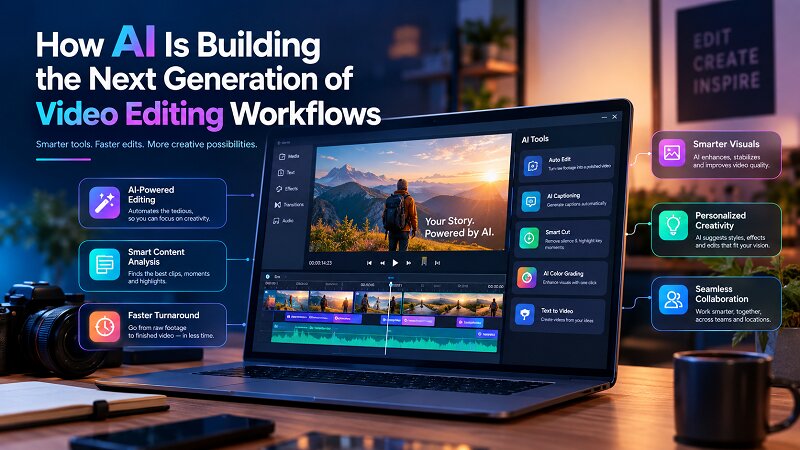
Video editing has always been a balance between creativity and time.
A filmmaker, content creator, or marketing team may spend hours planning and recording footage, but the real production work begins afterward. Sorting through clips, finding the best moments, removing unwanted sections, fixing audio issues, adjusting pacing, and preparing different versions for different platforms can take significantly longer than the recording itself.
For years, video editors have relied on powerful professional tools to handle this process. However, even advanced editing software still requires editors to manually perform many repetitive tasks.
The rise of AI is changing this workflow.
The next generation of video editing is not simply about generating videos from text prompts. It is moving toward AI-assisted editing environments where creators can work with real footage, communicate their intent, and use AI to speed up parts of the editing process.
This is where Invideo Editor enters the conversation.
Invideo Editor is designed as an AI-powered editing workspace that combines a professional timeline environment with an AI agent. Instead of replacing the editor, it works alongside creators by helping with time-consuming editing tasks while keeping creative decisions in human hands.
What Is invideo Editor?
Invideo Editor is a browser-based AI video editing platform built for creators who want more control than traditional AI video generators while still benefiting from automation.
The difference is important.
Many AI video tools focus on generating videos from a prompt:
“Create a promotional video about a fitness app.”
The tool creates a video based on the instruction.
Invideo Editor takes a different approach.
It focuses on the editing process itself.
Creators can work with:
- Existing video footage
- Timelines
- Audio tracks
- Visual elements
- Editing instructions
- AI-assisted workflows
The purpose is to help creators move faster through the editing process while maintaining the ability to refine every part of the final video.
Invideo Editor vs invideo Agent: Understanding the Difference
One area that often creates confusion is the difference between invideo Editor and invideo Agent.
They are connected, but they serve different purposes.
What Is invideo Agent?
Invideo Agent is focused on the creation side of video production.
It helps creators move from an idea or concept toward a video draft.
A typical workflow looks like:
Idea → Script → Story Planning → Video Creation
Creators can use AI agent to develop content ideas, generate concepts, and build initial video projects.
What Is invideo Editor?
Invideo Editor focuses on the editing and refinement process.
Its workflow is closer to:
Footage → Editing Timeline → Refinement → Final Video
It provides an environment where creators can adjust the details of their videos.
The easiest way to understand the difference:
Invideo Agent helps you create the first version.
Invideo Editor helps you shape that version into the final video.
Together, they represent two different stages of modern AI-assisted video production.
Why AI-Assisted Editing Is Becoming Important
The amount of video content being created today is increasing rapidly.
Creators are publishing:
- Long-form YouTube videos
- Short-form clips
- Podcasts
- Tutorials
- Product videos
- Online courses
- Marketing campaigns
The challenge is not only creating content. It is maintaining a consistent publishing schedule.
A creator recording a one-hour interview may need to:
- Review the entire recording
- Identify important moments
- Remove mistakes
- Improve pacing
- Add captions
- Create shorter versions
These tasks require time but do not always require creative decision-making.
This is where AI-assisted editing becomes valuable.
Modern editing workflows increasingly include features such as transcription, text-based editing, automatic captions, AI audio enhancement, automatic reframing, and AI-assisted organization. Editor Feature List
How invideo Editor Changes the Traditional Editing Workflow
A traditional editing process usually looks like this:
Record footage → Import media → Review clips → Build timeline → Edit manually → Export
The challenge is that the first few steps can consume hours.
An AI-assisted workflow changes the process:
Record footage → Upload footage → Give editing instructions → AI assists with preparation → Human editor refines the final version
The editor is still responsible for storytelling, but repetitive preparation becomes faster.
How AI Editing Works Inside invideo Editor
Working With Real Footage
One of the biggest differences between AI generation tools and AI editing tools is the source material.
Professional creators usually already have footage.
They are not looking for an AI-generated replacement.
They need help managing:
- Interviews
- Camera recordings
- Screen recordings
- Client footage
- Existing projects
Invideo Editor focuses on improving the workflow around this existing content.
Using AI agent for Editing Tasks
Instead of manually performing every small adjustment, creators can use AI agent to speed up parts of the workflow.
Examples include:
- Finding useful sections
- Removing unnecessary parts
- Improving pacing
- Creating cleaner first edits
The AI becomes an assistant rather than the final decision-maker.
Refining the Final Timeline
Creative control remains an important part of editing.
Creators can still decide:
- Which clips should stay
- How the story develops
- Where transitions should happen
- How the final video should feel
AI helps reduce the workload, but human creativity shapes the final result.
Key Features of invideo Editor
1. AI-Assisted Editing Workflow
The biggest advantage of invideo Editor is helping creators spend less time on repetitive editing tasks.
Instead of starting every project manually, creators can use AI agent to speed up early editing stages.
This is especially useful for:
- Interviews
- Podcasts
- Educational content
- Marketing videos
2. Timeline-Based Editing Environment
Professional editing requires precision.
A timeline gives creators control over:
- Clip arrangement
- Audio placement
- Timing
- Visual adjustments
- Final corrections
Unlike simple template editors, timeline-based workflows allow creators to make detailed changes before publishing.
3. Faster Content Repurposing
Modern creators rarely publish only one version of a video.
A single recording can become:
- Full YouTube content
- Short-form clips
- Social media videos
- Marketing assets
Features such as automatic reframing and caption workflows help creators adapt content for different platforms. Editor Feature List
4. Audio and Visual Improvements
Professional video quality depends on more than visuals.
Creators also need:
- Clean dialogue
- Balanced audio
- Consistent colors
- Better pacing
Modern AI editing workflows increasingly include audio cleanup, noise reduction, color agent, and other enhancement features. Editor Feature List
Invideo Editor for Different Types of Creators
YouTube Creators
YouTubers often record long videos but need shorter, engaging final edits.
invideo Editor can help reduce the time spent on repetitive editing tasks and allow creators to focus on storytelling.
Marketing Teams
Marketing teams constantly need new video assets.
From product launches to social campaigns, faster editing workflows can help teams produce more content without increasing production complexity.
Freelance Video Editors
Freelancers often handle repetitive client work.
AI agent can help with preparation tasks, allowing editors to spend more time on creative improvements.
Independent Filmmakers
Independent creators often work with limited resources.
AI-assisted editing can help small teams manage larger projects while keeping creative control.
Invideo Editor Compared With Traditional Editing Software
Traditional professional editors such as Premiere Pro and DaVinci Resolve provide extensive manual control. They remain powerful solutions for complex productions.
The difference with invideo Editor is the focus on AI-assisted workflow.
Traditional editing:
The editor manually performs most preparation tasks.
AI-assisted editing:
The editor provides creative direction while AI helps accelerate repetitive parts.
The future is likely not one replacing the other. Instead, AI will become another layer inside the editing workflow.
Does AI Replace Video Editors?
AI has changed many parts of content production, but storytelling remains human.
An AI tool can help organize footage or create an initial edit.
However, editors still make important decisions:
- What emotion should a scene create?
- Which moment should receive more attention?
- How should the story flow?
- What style represents the brand?
Editing is not only technical.
It is creative communication.
Who Should Consider Using invideo Editor?
invideo Editor is particularly useful for:
- Creators producing content regularly
- Marketing teams creating video campaigns
- Freelancers managing multiple projects
- Small teams that need faster production workflows
It is most valuable for people who already understand the importance of editing but want to reduce the time spent on repetitive tasks.
The Future of AI Video Editing
The future of video editing is moving toward collaboration between creators and intelligent tools.
Editors will continue making creative decisions, while AI handles more time-consuming technical work.
The workflow may become:
Human creates the vision.
AI helps organize and accelerate production.
Human completes the final creative direction.
invideo Editor represents this shift by bringing AI agent into the editing process itself rather than treating AI as only a video generation tool.
Final Thoughts
The biggest change in video editing is not that AI can create videos automatically.
The bigger change is that creators now have tools that understand the editing process and can assist with the work behind the scenes.
invideo Editor combines AI-assisted workflows with a timeline-based editing environment, giving creators a faster way to move from raw footage to finished videos.
For modern creators, marketers, and independent filmmakers, the advantage of AI editing is simple: less time spent on repetitive tasks and more time spent creating better stories.